
Redirecting mislabeled “Junk Email” to your Inbox
If you find an email that is NOT junk and you want it to route to your main inbox, please follow the directions below:
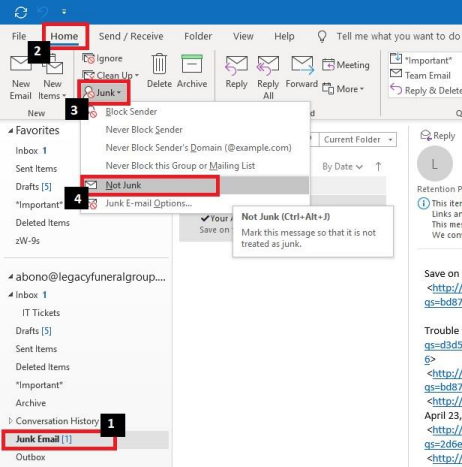
1. Select “Junk Email” in your mailbox on the left-hand side of Outlook
2. Select the “Home” tab
3. Select the “Junk” drop down
4. Choose “Not Junk”
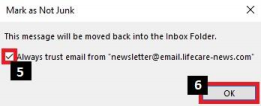
5. Ensure the checkbox to “Always trust email from ‘sender’” is checked
6. Select “OK”
Comments
0 comments
Please sign in to leave a comment.