

Enabling the Google Chrome “Webroot” extension:
“Webroot” is Legacy Funeral Groups Security Software. The Webroot extension helps to show which websites are safe and not safe to go to when browsing the internet.
If you do not see the exclamation point in Chrome, follow the below steps to enable the extension:
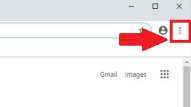
1. Open Google Chrome and click the three vertical dots at the top right corner
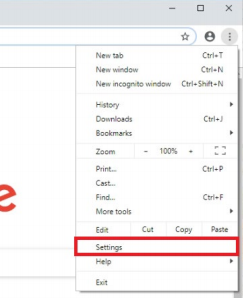
2. Click on “Settings” in the drop down menu

Enabling the Google Chrome “Webroot” extension:
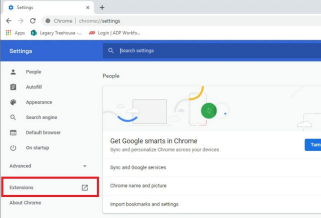
3. Click “Extensions” on the left-hand side of the page
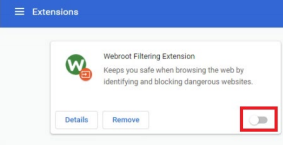
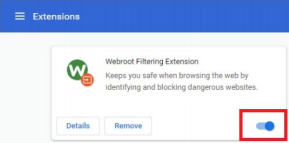
4. Toggle the switch under “Webroot Filtering Extension” to be blue


Comments
0 comments
Please sign in to leave a comment.